Within Record It
How to Capture a Clear Sky Sound Recording
A steady phone, uninterrupted audio and a wide view of the sky can preserve details that shaky, narrated clips often lose.
On this page
- Positioning the phone for stable audio
- Recording the sky and horizon together
- Keeping an untouched original file
Page outline Jump by section
Introduction
When an unusual sound appears to come from the sky, the value of a phone recording depends less on the latest handset and more on how it is used. A steady recording with clear, uninterrupted audio and a wide view of the sky and surrounding horizon gives investigators far more to work with than a shaky clip filled with commentary. NASA’s review of unidentified anomalous phenomena (UAP) highlighted that poor-quality sensor data and missing context often prevent meaningful analysis, making careful recording practices more important than speculation.[NASA Technical Reports Server]ntrs.nasa.govNASA Technical Reports ServerMethods for Recording and Documenting Ambient Environmental Sound for use in Listening Devices - NASA Techni…
This guide focuses specifically on setting up a phone to maximise the usefulness of an outdoor recording while preserving the original evidence. The aim is not to prove what caused a sound, but to capture it as faithfully as possible.
Position the Phone for Stable Audio
A phone’s built-in microphones are surprisingly capable, but they are also sensitive to handling noise. Every adjustment of your grip, every finger brushing the case and every sudden movement can create sounds that may be mistaken for something occurring in the environment.
For the clearest recording:
- Hold the phone with both hands or rest it on a stable surface if one is available.
- Avoid covering any microphone openings with your fingers or a phone case.
- Keep movements slow and deliberate rather than repeatedly pointing the phone around the sky.
- Once recording has started, resist the urge to stop and restart if the sound changes. A continuous recording preserves timing and acoustic transitions.
If you have a small tripod, clamp or other support, using it can eliminate much of the handling noise that commonly affects handheld recordings. Even leaning the phone against a fixed object is often better than holding it continuously. Guidance on smartphone audio recording consistently identifies handling noise as one of the easiest problems to avoid through stable positioning.[UC Agriculture and Natural Resources]ucanr.eduUC Agriculture and Natural Resources Recording | Communications ToolkitUC Agriculture and Natural Resources Recording | Communications Toolkit
Record the Sky and Horizon Together
The camera should provide environmental context rather than attempting to zoom in on an unknown source.
A useful framing usually includes:
- A broad section of sky.
- The visible horizon.
- Nearby buildings, trees or landmarks that establish orientation.
- Any aircraft, clouds or weather features entering the frame naturally.
Avoid digital zoom unless an identifiable object is clearly visible. Digital zoom generally reduces image quality while making camera shake more noticeable.
Keeping the horizon in view allows later reviewers to estimate elevation, direction of travel and possible relationships with visible aircraft or weather conditions. Even if nothing unusual appears visually, the footage documents lighting, cloud cover and environmental conditions at the time of the sound.
Reduce Wind Without Changing the Recording
Wind is one of the biggest causes of unusable outdoor audio. Strong gusts striking the microphone can produce low-frequency rumbling that overwhelms distant sounds.
Rather than relying entirely on software processing:
- Stand behind a wall, vehicle or building if it safely blocks the wind.
- Turn your body so it shields the phone from direct airflow.
- Hold the phone steadily instead of swinging it through the air.
- If using an external microphone, fit an appropriate windscreen.
Some modern smartphones automatically apply wind-noise reduction while recording video, and certain devices allow this feature to be enabled or disabled in settings. These tools can improve intelligibility, but because they modify the recorded signal, it is useful to know whether they were active when documenting an unexplained sound.[apple.com]support.apple.comSupport Change sound recording options on i Phone – Apple Support (UKApple SupportChange sound recording options on iPhone – Apple Support (UK)…
Avoid Interrupting the Recording
The temptation to narrate observations is understandable, but spoken commentary can permanently mask faint environmental sounds.
Instead:
- Begin recording as soon as possible.
- Allow several seconds of uninterrupted ambient sound before speaking, if speech is necessary at all.
- If you need to state the time or direction, do so briefly and then remain silent.
- Continue recording after the sound ends to capture the normal background environment for comparison.
The uninterrupted portions are often the most valuable because they preserve changes in loudness, rhythm and duration without introducing additional acoustic interference.
Keep an Untouched Original File
The original recording is usually the most valuable version.
After recording:
- Save the file immediately.
- Avoid trimming, filtering or applying noise reduction to the original.
- Make copies for sharing or enhancement while preserving the first version unchanged.
- Retain the original filename, creation date and embedded metadata where possible.
If later analysis is required, investigators can compare processed versions against the untouched recording. Preserving original metadata also helps establish when and how the recording was created, a point emphasised in NASA’s recommendations for improving the quality and traceability of observational data.[NASA Technical Reports Server]ntrs.nasa.govNASA Technical Reports ServerMethods for Recording and Documenting Ambient Environmental Sound for use in Listening Devices - NASA Techni…
Useful Phone Settings Before Recording
Preparing the phone before an outdoor recording reduces the chance of interruptions.
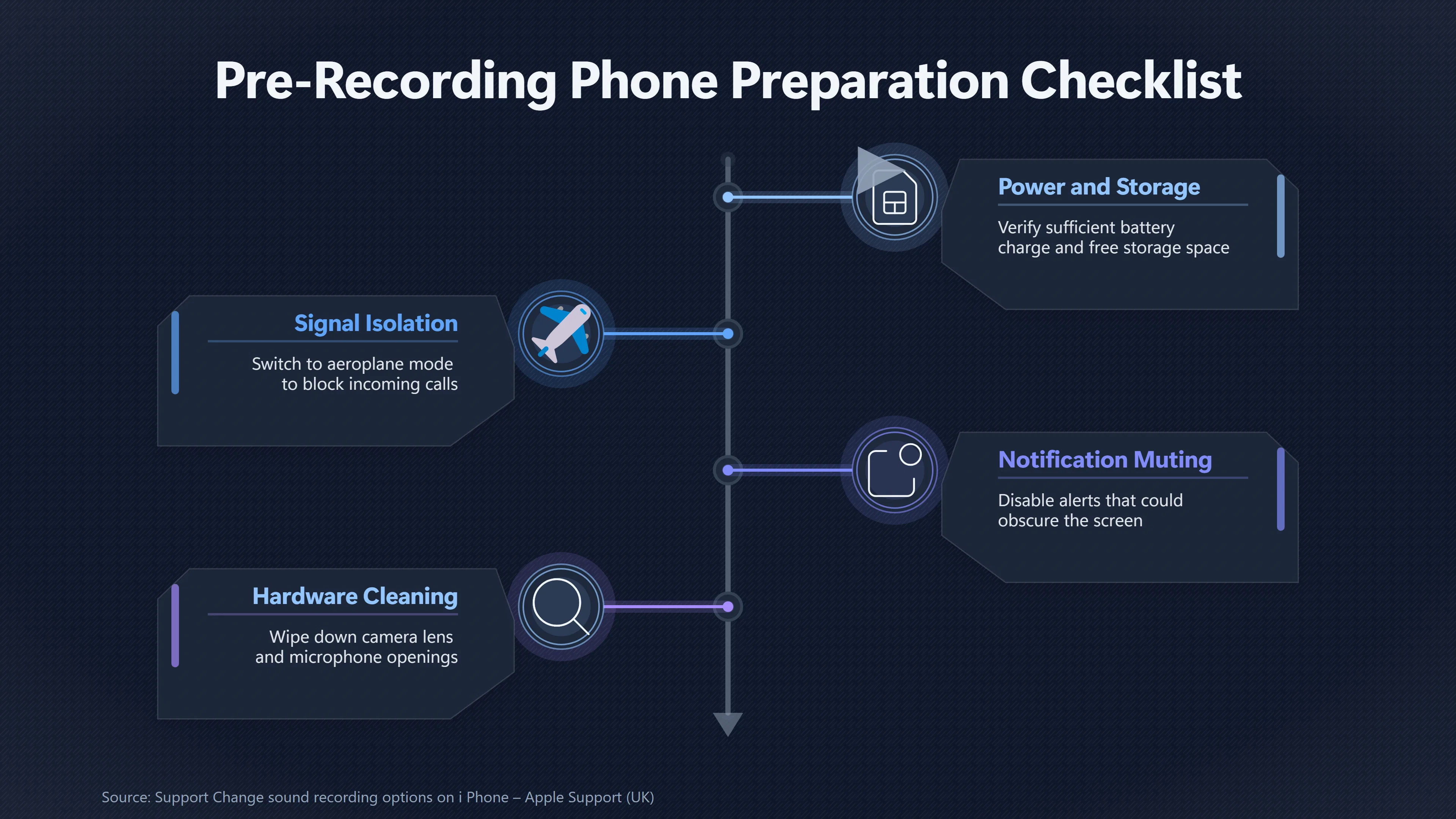
A practical checklist includes:
- Ensure sufficient battery charge.
- Confirm adequate free storage space.
- Switch to aeroplane mode if safe to do so, preventing calls from interrupting recording.
- Disable unnecessary notifications that could obscure the screen or stop recording.
- Clean the camera lens and microphone openings.
- Use the highest practical video quality if storage allows, while remembering that audio quality is usually more important than extreme video resolution for unexplained sky sounds.
If your device offers microphone recording options such as mono, stereo or spatial audio, leave the chosen setting consistent throughout the event rather than changing it mid-recording. Recording consistency is generally more valuable than experimenting while the sound is occurring.[Apple Support]support.apple.comSupport Change sound recording options on i Phone – Apple Support (UKApple SupportChange sound recording options on iPhone – Apple Support (UK)…
Common Mistakes That Reduce Evidential Value
Several common habits can make an otherwise useful recording much harder to interpret:
- Constantly zooming or panning across the sky.
- Narrating continuously over faint sounds.
- Stopping and restarting multiple recordings.
- Editing the only copy before saving the original.
- Covering microphones while adjusting grip.
- Pointing the phone at the ground or only at an empty patch of sky with no visible landmarks.
- Recording only a few seconds instead of capturing the full event and its aftermath.
A calm, continuous recording with stable framing and preserved original audio is generally far more informative than a dramatic but heavily edited clip. Even if the sound is ultimately explained by aircraft, weather or another ordinary source, careful phone setup ensures the recording remains useful for objective analysis rather than speculation.
Amazon book picks
Further Reading
Books and field guides related to How to Capture a Clear Sky Sound Recording. Use these as the next step if you want deeper reading beyond the article.
The Location Sound Bible
Written by a seasoned professional, Viers explains how to achieve Hollywood-quality sound that will make productions stand out from the r...
Producing Great Sound for Film and Video
Make your film or video project sound as good as it looks with this complete training course by audio guru Jay Rose. You get hundreds of...
The Bare Bones Camera Course for Film and Video
A timeless classic with more than 165,000 copies sold, The Bare Bones Camera Course for Film and Video has been chosen by over 700 colleg...
The Shut Up and Shoot Documentary Guide
So you want to make a documentary, but think you don't have a lot of time, money, or experience? It's time to get down and dirty! Down an...
eBay marketplace picks
Marketplace Samples
Live-tested eBay searches with available results related to this page.
Selected fromUFO poster oneBay.co.uk.

Current eBay listing
I Want To Believe UFO Poster Giclée Fine Art Heavyweight Print



Current eBay listing
VINTAGE UFO FLYING SAUCERS COMIC ADVERTISING A2 POSTER PRINT
Endnotes
1.
Source: ntrs.nasa.gov
Link:https://ntrs.nasa.gov/citations/20210017504
Source snippet
NASA Technical Reports ServerMethods for Recording and Documenting Ambient Environmental Sound for use in Listening Devices - NASA Techni...
2.
Source: support.apple.com
Title: Support Change sound recording options on i Phone – Apple Support (UK)
Link:https://support.apple.com/en-gb/guide/iphone/iph31c1ca6c7/ios
Source snippet
Apple SupportChange sound recording options on iPhone – Apple Support (UK)...
3.
Source: helpguide.sony.net
Link:https://helpguide.sony.net/mobile/xperia-1m6/v1/en/contents/reduce_wind_noise_record.html
Source snippet
Sony Help GuideXperia 1 VI XQ-EC54/XQ-EC72 | Help Guide | Reducing wind noise when recording...
4.
Source: science.nasa.gov
Title: sounds of mars
Link:https://science.nasa.gov/mission/mars-2020-perseverance/sounds-of-mars/
Source snippet
What's different about Mars? Rover microphones OVERVIEW The Perseverance rover carries two microphones, letting us directly record the so...
5.
Source: nasa.gov
Title: NAS A Policy on the Release of Information to News and Information Media
Link:https://www.nasa.gov/reference/nasa-policy-on-the-release-of-information-to-news-and-information-media/
6.
Source: science.nasa.gov
Title: listen to nasas ingenuity mars helicopter in flight 2
Link:https://science.nasa.gov/resource/listen-to-nasas-ingenuity-mars-helicopter-in-flight-2/
7.
Source: science.nasa.gov
Title: first audio recording of sounds on mars
Link:https://science.nasa.gov/resource/first-audio-recording-of-sounds-on-mars/
8.
Source: support.apple.com
Link:https://support.apple.com/en-euro/guide/iphone/iph8dc8a5c3c/ios
9.
Source: sony.com
Link:https://www.sony.com/electronics/support/articles/00297234
10.
Source: sony.com
Link:https://www.sony.com/electronics/support/e-mount-body-zv-e-series/zv-e1/articles/00293374
11.
Source: sony.com
Link:https://www.sony.com/electronics/support/e-mount-body-zv-e-series/zv-e10m2/articles/00345862
12.
Source: ucanr.edu
Title: UC Agriculture and Natural Resources Recording | Communications Toolkit
Link:https://ucanr.edu/dept/communications-toolkit/recording
13.
Source: ucanr.edu
Link:https://ucanr.edu/node/139693/printable/print
Additional References
14.
Source: journalism.university
Title: The wind picks up. Traffic rumbles in the d
Link:https://journalism.university/audio-podcast/guide-microphones-booms-outdoor-recording/
Source snippet
A Guide to Microphones and Booms for Outdoor Recording • Journalism UniversityJanuary 12, 2026 — A GUIDE TO MICROPHONES AND BOOMS FOR OUT...
Published: January 12, 2026
15.
Source: videomaker.com
Title: How to record professional-level audio with your smartphone
Link:https://www.videomaker.com/how-to-record-professional-level-audio-with-your-smartphone/?amp=1
Source snippet
How to record professional-level audio with your smartphone - Videomaker...
16.
Source: youtube.com
Title: Field Recording: Capturing Musical Sounds (Tips, Gear & Techniques) 1 of 3
Link:https://www.youtube.com/watch?v=qLrS8ZRbkks
Source snippet
Field Recording For Beginners - Essential GEAR & TIPS...
17.
Source: sony.co.uk
Title: wh 1000xm6
Link:https://www.sony.co.uk/electronics/support/wireless-headphones-bluetooth-headphones/wh-1000xm6/articles/00229342
Source snippet
How to reduce wind noise on Sony headphones and earbuds when Noise Canceling or Ambient Sound Mode is on | Sony UKJune 17, 2026 — Article...
Published: June 17, 2026
18.
Source: ojp.gov
Link:https://www.ojp.gov/library/publications/forensic-handling-user-generated-audio-recordings
19.
Source: sony.co.uk
Title: wh 1000xx
Link:https://www.sony.co.uk/electronics/support/wireless-headphones-bluetooth-headphones/wh-1000xx/articles/00229342
Source snippet
How to reduce wind noise on Sony headphones and earbuds when Noise Canceling or Ambient Sound Mode is on | Sony UKJune 12, 2026 — Article...
Published: June 12, 2026
20.
Source: youtube.com
Title: Field Recording For Beginners
Link:https://www.youtube.com/watch?v=bLY0ZUrlm78
Source snippet
How to Easily Record GREAT Audio Outdoors...
21.
Source: nij.ojp.gov
Title: forensic handling user generated audio recordings
Link:https://nij.ojp.gov/library/publications/forensic-handling-user-generated-audio-recordings
22.
Source: popsci.com
Title: How to record better sound on your smartphone | Popular Science
Link:https://www.popsci.com/record-better-smartphone-audio/
23.
Source: youtube.com
Title: How to Easily Record GREAT Audio Outdoors!
Link:https://www.youtube.com/watch?v=1sbhJAQaCEo
Source snippet
How to get good audio outdoors...